
Improve the recording of Patients’ Smoking Status




In Australia, smoking remains the leading preventable cause of illness and death. Tobacco use harms almost every organ in the body and significantly increases the risk of chronic conditions, including cardiovascular disease, cancer, chronic respiratory disease, chronic kidney disease, and diabetes.
Accurately recording smoking status in your clinical information system provides several benefits, including:
Recording tobacco use in clinical system will allow for:
Increasing opportunities for clinicians to discuss smoking cessation with current smokers.
Supporting risk assessment and preventive care.
Facilitating appropriate screening and early detection of smoking-related health conditions.
Improving the quality and completeness of patient health records.
QI activity overview
What is the aim of this QI activity
Improve the smoking recording rate of active patients in your practice
Record the smoking status of 30 active patients who are aged 15 years and over in a 4-week period.
What will I need to do?
Record the smoking status of your active patients in the correct field of patient file in your clinical software.
How will I complete this activity?
Record smoking status – current smoker, ex-smoker, never smoked
Date of smoking status recorded
Where do I document my results?
Who can I contact for support?
For support with this activity please contact the General Practice Quality Improvement team on Ph. 38647540 or email [email protected]
Step 1: Start your activity
1. Identify active patients with missing smoking status record
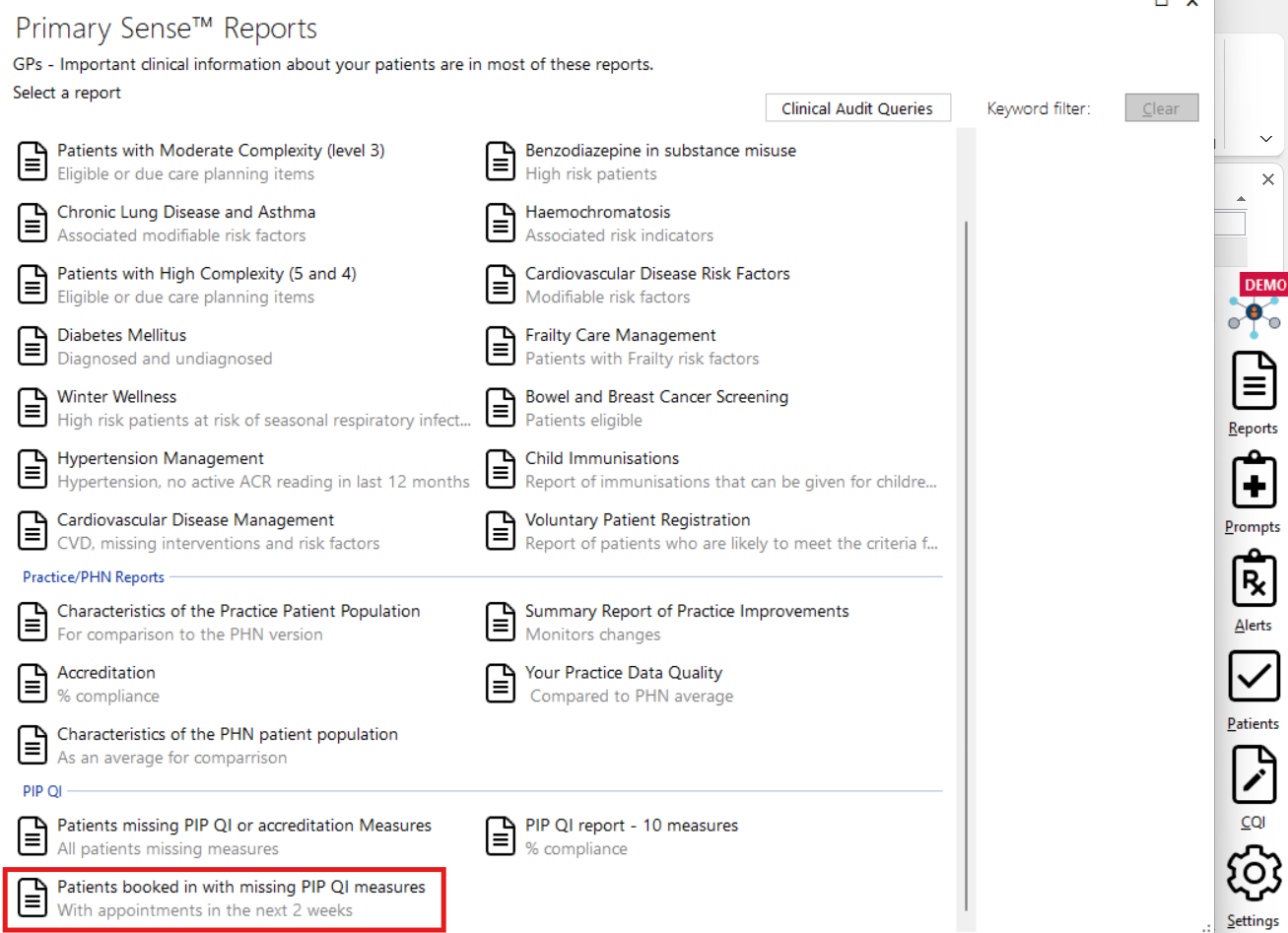
Using Primary Sense, identify 30 patients whose smoking status is not recorded. To do this we suggest reviewing the “patients booked in with missing PIP QI measures” report twice a week or more until 30 patient files have been updated with smoking record. This is because your appointment book changes regularly.
2. Flag patients who require smoking status update
Discuss as a team how and where patient records can be flagged when a smoking status update is required. Agree on a consistent process and use this method to flag the patients identified in Step 1.
3. Update patient’s smoking status when attending the appointment
With patient flagging process in place, team members are to confirm and update patient’s smoking status in the correct field in your clinical software.
For Best Practice users:
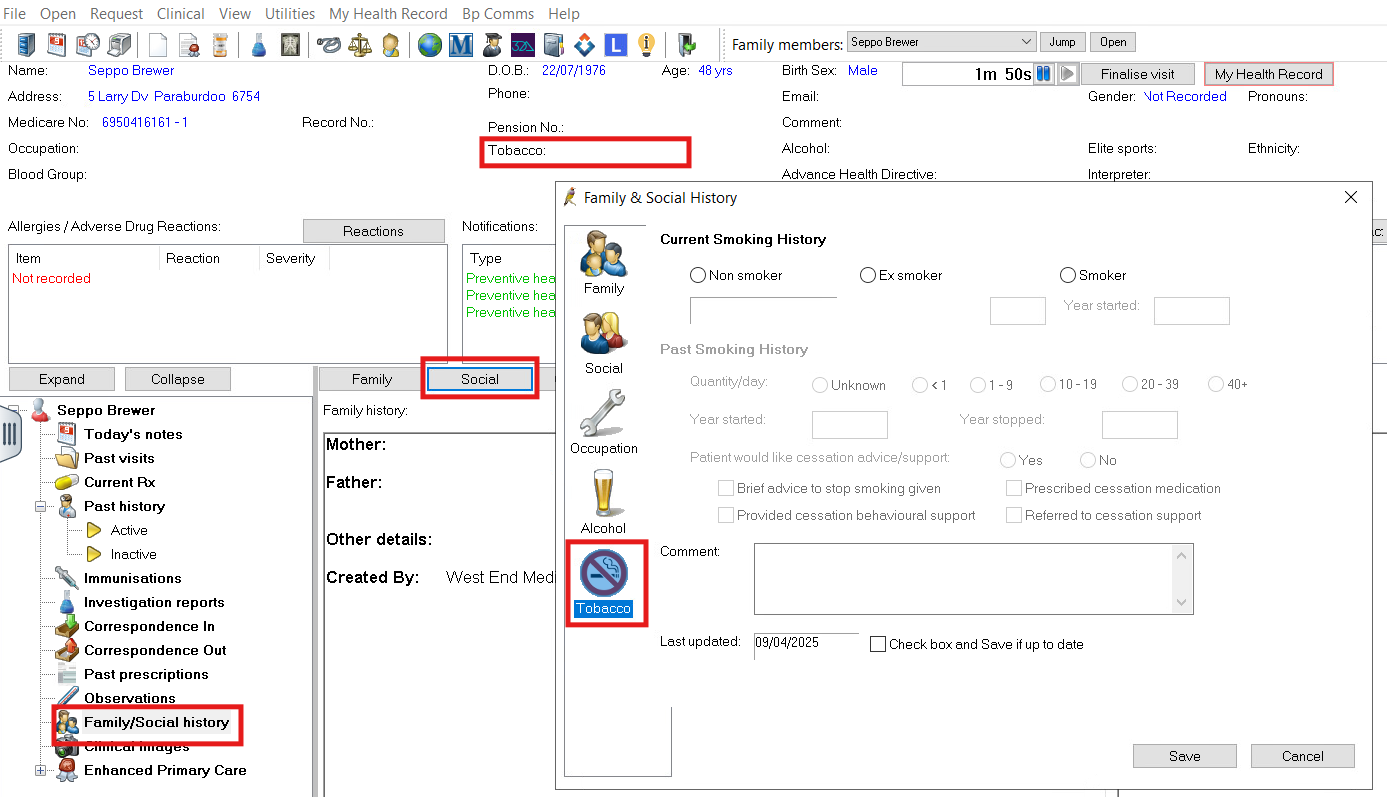
There are two options to access the smoking recording field:
A single click on the tobacco field in the patient details section.
Access from the family/social history section on the left-hand side pane, click on “social” then “tobacco” to update the record.
For MedicalDirector users:
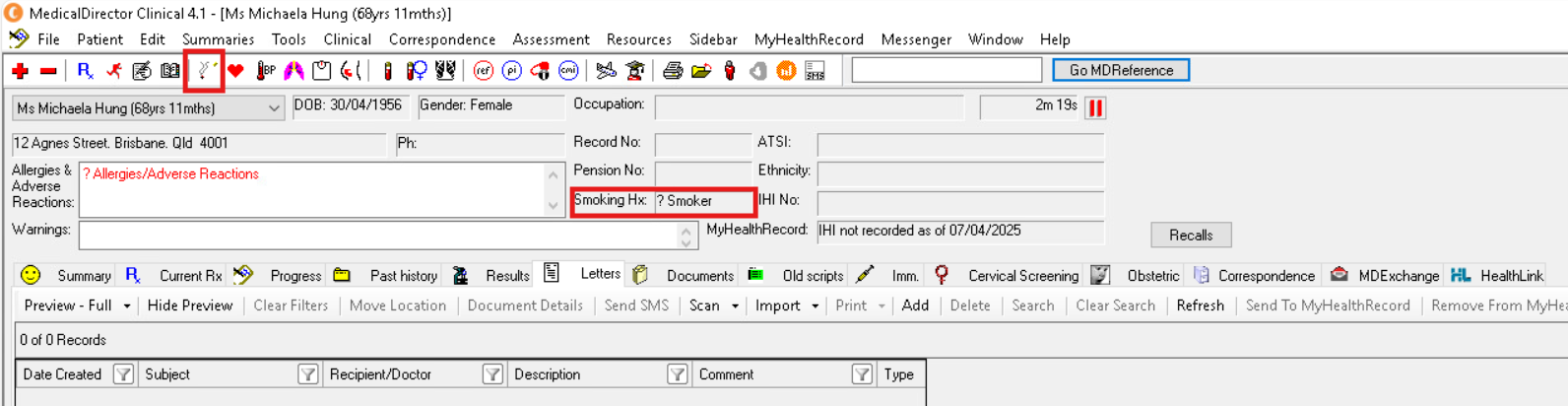
There are two options to access the smoking recording field:
Click on the smoking icon on the top bar.
Click on the “smoking Hx” field to record the status.
4. Document progress
Document the progress of your activity. You can use the MFI/PDSA template to record your progress and results or simply document your results in the QI summary register.
Step 2: Track your results
Tracking results
This section will assist you to track your results and answer the following questions:
How will you know that change is an improvement?
What data will be used to track the improvement?
What is the current data showing?
Suggested measures and data sources
With a goal of updating 30 records for this activity, manual tracking is a simple and convenient option. You can opt for a tally table or cross the list in the Primary Sense report each time a patient’s smoking status is updated until the goal is reached.
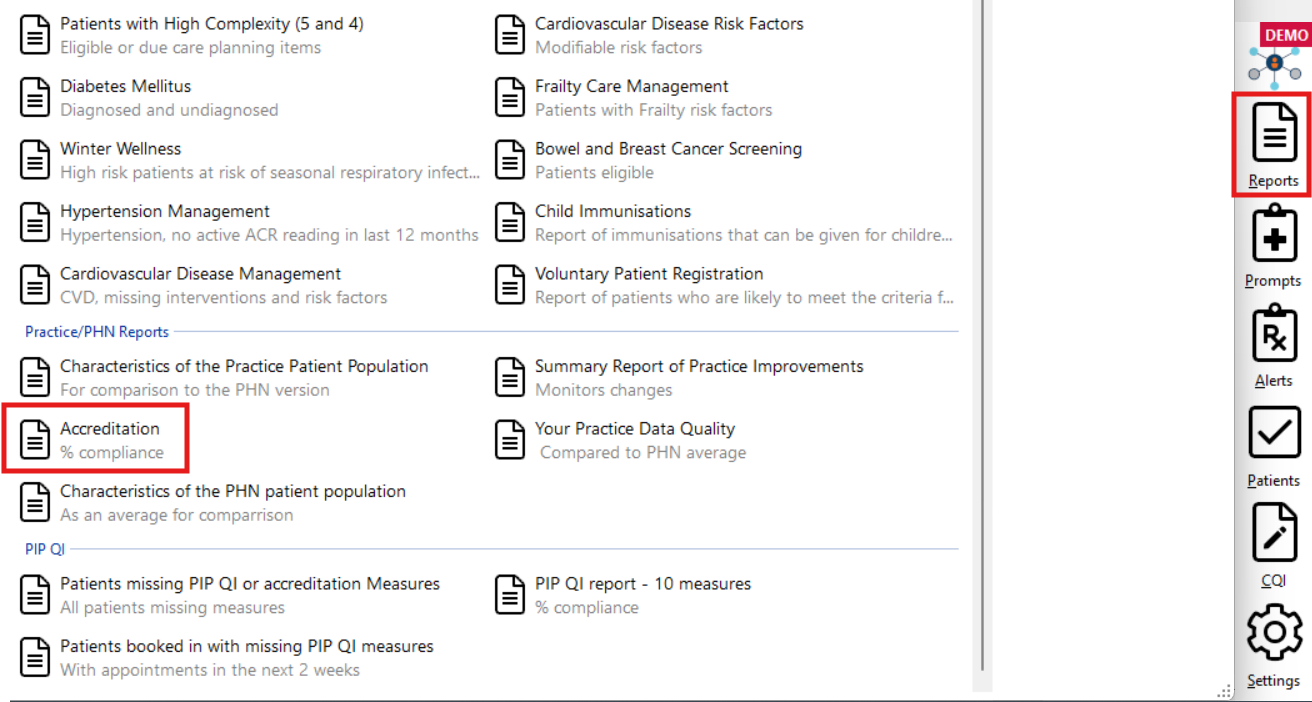
For ongoing monitoring, practices can use “accreditation % compliance” report in Primary Sense or Practice Report Dashboard to track your proportion of patients with smoking status recorded
Step 3: Complete and reflect on your activity
How did you go?
As a team, reflect on how the activity went.
What were the challenges/barriers?
What worked well?
Are there any changes that you could implement to support the recording of smoking status of your patients in your practice?
Share your results
Share your results with your team and Brisbane South PHN.
Next steps
Consider how smoking status can be used to tailor the interventions and screening programs to meet your patients’ individual health needs.
Example of completed QI activity
QI activity example
View the Model for Improvement (MFI) diagram and Plan, Do, Study Act (PDSA) example of a practice aiming to increase their proportion of active patients with smoking status recorded.
Resources to support with your activity
Please find below tools and resources to support with your activity.
Tools and resources
Model for improvement/PDSA template
QI summary register
Roles and responsibility – team activity worksheet
Brisbane South HealthPathways (Lifestyle and Preventive Care -> Smoking Cessation)
My QuitBuddy app
Quit HQ
Tackling Indigenous Smoking
Vaping Exposed
PIP QI Incentive: User Guide for Practices - refer to Section 3.2 Proportion of patients with a smoking status
RACGP Standards for general practices 5th edition (refer to Criterion QI2.1 - Health Summaries)
We appreciate your feedback!
Our Quality Improvement Team works with general practices to provide practical advice and resources to help plan, implement, and review your QI activities. Your feedback helps our team to provide the best possible support for your practice.
Contact General Practice Quality Improvement
Phone: 07 3864 7540